
Cart 0 Product Products (empty)
No products
To be determined Shipping
0,00 € Total
Product successfully added to your shopping cart
Quantity
Total
There are 0 items in your cart. There is 1 item in your cart.
Total products
Total shipping To be determined
Total
Flysky
- DRONES
- HELIS
- PLANES
- CARS
- BOATS
- SPARE PARTS
- QUAD COPTERS
- MICRO QUAD PARTS
- ALIGN M424 Quadcopter
- Quanum/CX-20/ DJI PARTS
- Cheerson CX-33 Parts
- Cheerson CX-35 parts
- freeX Parts
- SYMA X5 PARTS
- SYMA X8 PARTS
- HUSBAN PARTS
- WLtoys PARTS
- Tarantula X6
- Q-BOT PARTS
- Zoopa Q parts
- Eachine
- VISUO XS809/XS816 parts
- Eachine E58 PARTS / X-PRO
- VISUO XS812 GPS parts
- SHRC H1G GPS PARTS
- Eachine Tyro99
- Wltoys XK X1
- FUNSKY S20 PARTS
- Eachine E520S GPS PARTS
- Eachine E511S GPS PARTS
- Eachine Tyro79 parts
- Eachine EG16 parts
- Eachine Tyro129 parts
- Eachine Tyro109 parts
- Eachine Tyro69 parts
- JJRC X16 5G parts
- Eachine Tyro89 parts
- ΕΛΙΚΟΠΤΕΡΑ
- ALIGN
- ESKY
- E-FLITE
- TAROT (100% COPY ALIGN)
- WALKERA
- Walkera 38 Parts
- Walkera 4-3B/4-3Q2 Parts
- Walkera 5-10 Parts
- Walkera 5-6 Parts
- Walkera 53-1 Parts
- Walkera 5G6 Parts
- Walkera LAMA2 Parts
- Walkera UFO 5 Parts
- Walkera 4G3 Parts
- Walkera Metal Upgrade Parts
- Walkera 5G6-1 Parts
- Walkera 5G4Q3 Parts
- WALKERA 5-4,5,8 PARTS
- Walkera 53Q3 PARTS
- Walkera UFO8 Parts
- Walkera LAMA 400 Parts
- WALKERA LAMA2Q PARTS
- WALKERA LAMA2Q1 PARTS
- WALKERA UFLY
- Walkera 4G6
- SKYARTEC
- SKYA
- Hisky
- Wltoys
- ARK
- HK
- THUNDER TIGER
- GAUI
- ELE
- OUTRAGE
- COPTER X
- HDX
- Copter V-MAX Parts
- Copter Mini X - SH-6025-1
- ACME HELIS
- XK
- Eachine Parts
- XK-WLTOYS
- RC ERA HELIS
- ΑΕΡΟΠΛΑΝΑ
- ΑΥΤΟΚΙΝΗΤΑ
- Accessories
- 1/16 Short Course Truck
- 1/16 Brushless 4WD Racing Buggy
- JJRC Q35/Q36 PARTS
- 9115 parts
- Wltoys A989/A999/L939/K969/K989
- WLtoys A949 A959 A969 A979 PARTS
- Wltoys L959/L969/L979
- Wltoys 144001 parts
- Pxtoys PX9300 1/18
- RC Trailer
- Wltoys 12429 parts
- Eachine EAT04/Feiyue FY01/2/3 1/12 parts
- XLF X03 1/10 PARTS
- Xinlehong 913xx 1/16 PARTS
- Wltoys 12428 parts
- Wltoys 104001 1/10 PARTS
- Wltoys 124017 1/12 PARTS
- Wltoys 124018 1/12 PARTS
- HBX 16886 1/14 4WD PARTS
- HBX 903 RTR 1/12 2.4G 4WD PARTS
- HBX 16889A Pro 1/16 2.4G PARTS
- Wltoys 104009/12402 1/10 PARTS
- Wltoys XK 22201 1/22 parts
- F-20 2.4GHz 1/12 - PARTS
- Wltoys 144010 1/14 PARTS
- Eachine EAT15 Parts
- Wltoys 124010 1/12 PARTS
- Wltoys 284131 1/28 PARTS
- Wltoys 284161 1/28 PARTS
- Wltoys 124008 1/12 PARTS
- Wltoys 284010 1/28 PARTS
- 1/10 HSP PARTS
- Wltoys 184008 1/18 - parts
- WLTOYS 144016 1/14 - PARTS
- BOATS
- BLADES
- RC BEARINGS
- QUAD COPTERS
- RADIOS
- ELECTRONICS
- SPEED CONTROLLERS
- SERVOS
- FPV SYSTEMS
- ΚΑΛΩΔΙΑ & ADAPTERS
- SIMULATORS
- BEC & Regulator
- GADGETS
- ΜΠΟΥΖΟΠΙΠΕΣ
- ΦΩΤΑ & Night Flying
- ACME FlyCams
- ΔΙΑΦΟΡΑ
- BATTERIES & CHARGERS
- MOTOR
- TOOLS-ACCESSORIES
- ΕΡΓΑΛΕΙΑ ΜΕΤΡΗΣΕΩΝ
- ΒΑΛΙΤΣΕΣ
- COVERING FILMS
- ΚΟΛΛΕΣ & ThreadLock
- ΑΕΡΟΓΡΑΦΟΙ
- ΝΤΙΖΕΣ & AΞΕΣΟΥΑΡ
- ΔΙΑΦΟΡΑ ΑΞΕΣΟΥΑΡ
- ΑΞΕΣΟΥΑΡ NITRO
- ΜΠΟΥΖΙ
- ΜΙΖΕΣ
- ΤΡΟΜΠΕΣ ΚΑΥΣΙΜΟΥ
- ΕΡΓΑΛΕΙΑ & ΟΡΓΑΝΑ ΑΚΡΙΒΕΙΑΣ
- ΦΙΛΤΡΑ ΚΑΥΣΙΜΟΥ
- ΒΙΔΕΣ & Washer & E-Clips
- TRAINING KIT
- PITCH GAUGE
- TESTER
- TAPES & VELCRO
- Lubricants & Accessories
- DECALS & STICKERS
- ΕΡΓΑΛΕΙΑ MULTIFUNCTIONAL SKYA
- ΖΥΓΑΡΙΕΣ
- Cleaning Accessories
- Swashplate Leveler
- Starter Shaft
- Glow Ignitors
- DIGITAL MULTIMETERS
- LIGHTNING LED
- SOLDERING IRON
- HAND TOOLS
- DEPRON
- ΚΟΥΤΙΑ ΑΠΟΘΗΚΕΥΣΗΣ
- ΜΠΡΟΣΕΛΕΣ
- ΔΕΜΑΤΙΚΑ
- FOR BEGINNERS
- GADGETS FOR PC
- MAGAZINES & DVD
- SLUBAN BRICKS
- 3D PRINTERS / SCANNERS
- 3D PUZZLES
- ARDUINO - ROBOTICS
- DIY Electronic KIT
 View larger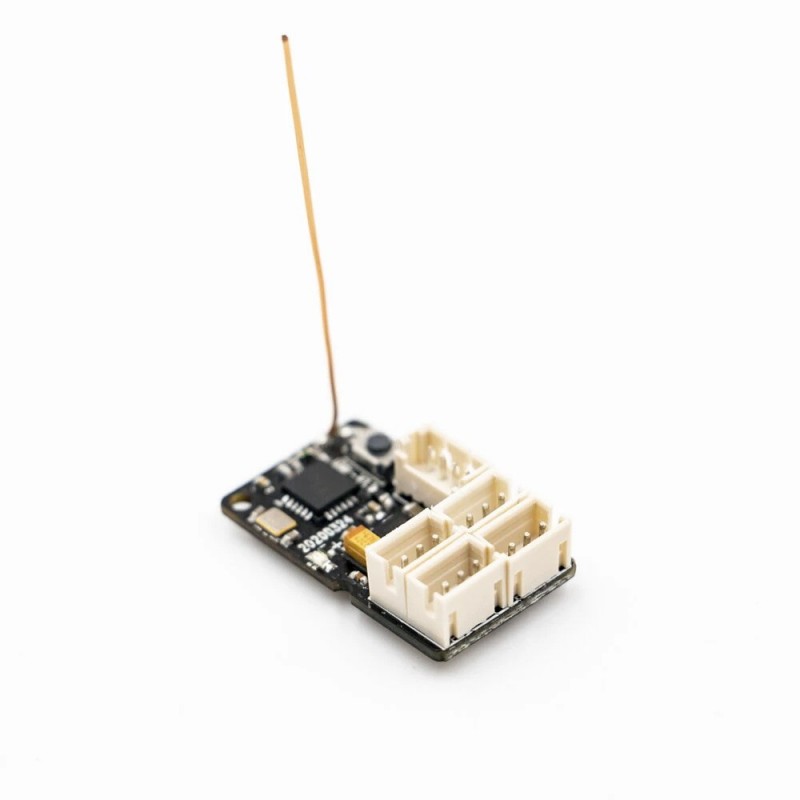
FlySky GMR 2.4GHz 4CH AFHDS 3 Micro RC Receiver PWM Output Compatible PL18 NB4/Lite for RC Car
(SKU): F40561
FlySky GMR 2.4GHz 4CH AFHDS 3 Micro RC Receiver PWM Output Compatible PL18 NB4/Lite for RC Car
In stock
More info
FlySky GMR 2.4GHz 4CH AFHDS 3 Micro RC Receiver PWM Output Compatible PL18 NB4/Lite for RC Car
OVERVIEW:
GMr is a 4-channel micro/mini car receiver, using AFHDS 3 (third-generation automatic frequency hopping digital system), single external antenna bidirectional transmission, micro size and reserved gyro interface.
Description:
Brand Name: FlySky
Item Name: GMR Receiver
Dimensions: 23.5*13.5*7mm
Weight: 1.7g
Model: GMR
PWM Channel: 4
Wireless Frequency: 2.4GHz
Wireless Protocol: AFHDS 3
Range: >50m (Ground)
Antenna Type: single antenna (32mm)
Power: 3.5-9V
RSSI: Supported
Data port: PWM
Temperature range: -10 ℃ — + 60 ℃
Humidity range: 20% -95%
Online Update: Yes
Certification: CE, FCC ID: N4ZGMR00
The receiver is compatible with PL18/NB4 and NB4 Lite all of transmitters which with AFHDS 3 protocol.
Binding:
1. Press and hold the receiver Bind button while powering on the receiver, then release button after powering on.
- The receiver's LED flash quickly indicating that it has entered bind mode.
2. Put the transmitter into bind mode.(See the transmitter's instruction manual for more information)
3. Binding is successful when the receiver's LED stop flashing.
- If the transmitter is one-way transmission, manually exit the transmitter when the receiver status indicator flashes slowly,Binding is successful when the receiver's LED stop flashing.
4. Check to make sure that the transmitter and receiver are working as expected, if there are any issues or unexpected operation follow the steps above to bind again.
Forced update:
If after an update the transmitter is unable to connect or bind to the receiver, it is necessary to put the receiver into forced update mode.
1.Press and hold the Bind button while powering on the receiver simultaneously,
press and hold for 10 seconds to enter forced update mode, during this time the LED flashes three times and off one time;
2. Select the receiver to update on the transmitter side to enter the update mode;the LED flashes three times and off one time during the updating process;
3. updating is successful when the receiver status indicator flashes slowly.
Package Included:
1 x GMR Receiver


