
Καλάθι: 0 προϊόν Προϊόντα (άδειο)
Κανένα προϊόν
Θα καθοριστεί Αποστολή
0,00 € Σύνολο
Το προϊόν προστέθηκε με επιτυχία στο καλάθι αγορών σας
Ποσότητα
Σύνολο
Υπάρχουν 0 αντικείμενα στο καλάθι σας. Υπάρχει ένα προϊόν στο καλάθι σας.
Σύνολο προϊόντων
Σύνολο μεταφορικών Θα καθοριστεί
Σύνολο
FPV CAMERA
- DRONES
- ΕΛΙΚΟΠΤΕΡΑ
- ΑΕΡΟΠΛΑΝΑ
- ΑΥΤΟΚΙΝΗΤΑ
- ΣΚΑΦΗ
- ΑΝΤΑΛΛΑΚΤΙΚΑ
- QUAD COPTERS
- MICRO QUAD PARTS
- ALIGN M424 Quadcopter
- Quanum/CX-20/ DJI PARTS
- Cheerson CX-33 Parts
- Cheerson CX-35 parts
- FreeX Parts
- SYMA X5 PARTS
- SYMA X8 PARTS
- HUSBAN PARTS
- WLtoys V686 PARTS
- Tarantula X6
- Q-BOT parts
- Zoopa Q parts
- Eachine
- VISUO XS809/XS816 parts
- Eachine E58 PARTS / X-PRO
- VISUO XS812 GPS parts
- SHRC H1G GPS PARTS
- Eachine Tyro99
- Wltoys XK X1
- FUNSKY S20 PARTS
- Eachine E520S GPS PARTS
- Eachine E511S GPS PARTS
- Eachine Tyro79 parts
- Eachine EG16 parts
- Eachine Tyro129 parts
- Eachine Tyro109 parts
- Eachine Tyro69 parts
- JJRC X16 5G parts
- Eachine Tyro89 parts
- ΕΛΙΚΟΠΤΕΡΑ
- ALIGN
- TREX 100 / TREX 100X
- TREX 150 DFC
- TREX 250 / DFC
- TREX 250SE/PRO/DFC
- TREX 450SE/V1/V2/V3
- TREX 450 SPORT/V2/PLUS
- TREX 450 PRO/V2/DFC/3GX
- 450L DOMINATOR Parts
- TREX 500 /ESP/EFL/PRO/3G/DFC
- TREX 550E / PRO / DFC
- TREX 600E / ESP / 3G / PRO / EFL / DFC
- TREX 600N / Limited / 3G
- TREX 700N / Limited / 700E / 3G / DFC / 800E
- ESKY
- E-FLITE
- TAROT (100% COPY ALIGN)
- WALKERA
- Walkera 38 Parts
- Walkera 4-3B/4-3Q2 Parts
- Walkera 5-10 Parts
- Walkera 5-6 Parts
- Walkera 53-1 Parts
- Walkera 5G6 Parts
- Walkera LAMA2 Parts
- Walkera UFO 5 Parts
- Walkera 4G3 Parts
- Walkera Metal Upgrade Parts
- Walkera 5G6-1 Parts
- Walkera 5G4Q3 Parts
- WALKERA 5-4,5,8 PARTS
- Walkera 53Q3 PARTS
- Walkera UFO8 Parts
- Walkera LAMA 400 Parts
- WALKERA LAMA2Q PARTS
- WALKERA LAMA2Q1 PARTS
- WALKERA UFLY
- Walkera 4G6
- SKYARTEC
- SKYA
- Hisky
- Wltoys
- ARK
- HK
- THUNDER TIGER
- GAUI
- ELE
- OUTRAGE
- COPTER X
- HDX
- Copter V-MAX Parts
- Copter Mini X - SH-6025-1
- ACME HELIS
- XK
- Eachine Parts
- XK-WLTOYS
- RC ERA HELIS
- ALIGN
- ΑΕΡΟΠΛΑΝΑ
- ΑΥΤΟΚΙΝΗΤΑ
- Accessories
- 1/16 Short Course Truck
- 1/16 Brushless 4WD Racing Buggy
- JJRC Q35/Q36 PARTS
- 9115 parts
- Wltoys A989/A999/L939/K969/K989
- WLtoys A949 A959 A969 A979 PARTS
- Wltoys L959/L969/L979
- Wltoys 144001 parts
- Pxtoys PX9300 1/18
- RC Trailer
- Wltoys 12429 parts
- Eachine EAT04/Feiyue FY01/2/3 1/12 parts
- XLF X03 1/10 PARTS
- Xinlehong 913xx 1/16 PARTS
- Wltoys 12428 parts
- Wltoys 104001 1/10 PARTS
- Wltoys 124017 1/12 PARTS
- Wltoys 124018 1/12 PARTS
- HBX 16886 1/14 4WD PARTS
- HBX 903 RTR 1/12 2.4G 4WD PARTS
- HBX 16889A Pro 1/16 2.4G PARTS
- Wltoys 104009/12402 1/10 PARTS
- Wltoys XK 22201 1/22 parts
- F-20 2.4GHz 1/12 - PARTS
- Wltoys 144010 1/14 PARTS
- Eachine EAT15 Parts
- Wltoys 124010 1/12 PARTS
- Wltoys 284131 1/28 PARTS
- Wltoys 284161 1/28 PARTS
- Wltoys 124008 1/12 PARTS
- Wltoys 284010 1/28 PARTS
- 1/10 HSP PARTS
- Wltoys 184008 1/18 - parts
- WLTOYS 144016 1/14 - PARTS
- ΒΑΡΚΕΣ
- ΕΛΙΚΕΣ - BLADES
- RC BEARINGS
- QUAD COPTERS
- ΤΗΛΕΚΑΤΕΥΘΥΝΣΕΙΣ
- ΗΛΕΚΤΡΟΝΙΚΑ
- SPEED CONTROLLERS
- SERVOS
- FPV SYSTEMS
- ΚΑΛΩΔΙΑ & ADAPTERS
- ΕΞΟΜΟΙΩΤΕΣ
- BEC & Regulator
- GADGETS
- ΜΠΟΥΖΟΠΙΠΕΣ
- ΦΩΤΑ & Night Flying
- ACME FlyCams
- ΔΙΑΦΟΡΑ
- ΜΠΑΤΑΡΙΕΣ & ΦΟΡΤΙΣΤΕΣ
- ΜΟΤΕΡ
- ΕΡΓΑΛΕΙΑ & ΑΞΕΣΟΥΑΡ
- ΕΡΓΑΛΕΙΑ ΜΕΤΡΗΣΕΩΝ
- ΒΑΛΙΤΣΕΣ
- COVERING FILMS
- ΚΟΛΛΕΣ & ThreadLock
- ΑΕΡΟΓΡΑΦΟΙ
- ΝΤΙΖΕΣ & AΞΕΣΟΥΑΡ
- ΔΙΑΦΟΡΑ ΑΞΕΣΟΥΑΡ
- ΑΞΕΣΟΥΑΡ NITRO
- ΜΠΟΥΖΙ
- ΜΙΖΕΣ
- ΤΡΟΜΠΕΣ ΚΑΥΣΙΜΟΥ
- ΕΡΓΑΛΕΙΑ & ΔΙΑΦΟΡA Accessories
- ΦΙΛΤΡΑ ΚΑΥΣΙΜΟΥ
- ΒΙΔΕΣ & Washer & E-Clips
- TRAINING KIT
- PITCH GAUGE
- SERVO TESTER
- TAPES & VELCRO
- Lubricants & Accessories
- DECALS & STICKERS
- ΕΡΓΑΛΕΙΑ SKYA
- ΖΥΓΑΡΙΕΣ
- Cleaning Accessories
- Swashplate Leveler
- Starter Shaft
- Glow Ignitors
- ΨΗΦΙΑΚΑ ΠΟΛΥΜΕΤΡΑ
- ΦΩΤΙΣΤΙΚA LED
- ΚΟΛΛΗΤΗΡΙΑ
- ΕΡΓΑΛΕΙΑ ΧΕΙΡΟΣ
- DEPRON
- ΚΟΥΤΙΑ ΑΠΟΘΗΚΕΥΣΗΣ
- ΜΠΡΟΣΕΛΕΣ
- ΔΕΜΑΤΙΚΑ
- ΓΙΑ ΑΡΧΑΡΙΟΥΣ
- GADGETS FOR PC
- ΠΕΡΙΟΔΙΚΑ & DVD
- SLUBAN ΤΟΥΒΛΑΚΙΑ
- 3D PRINTERS / SCANNERS
- 3D PUZZLES
- ARDUINO - ΡΟΜΠΟΤΙΚΗ
- DIY Electronic KIT
 Μεγαλύτερη προβολή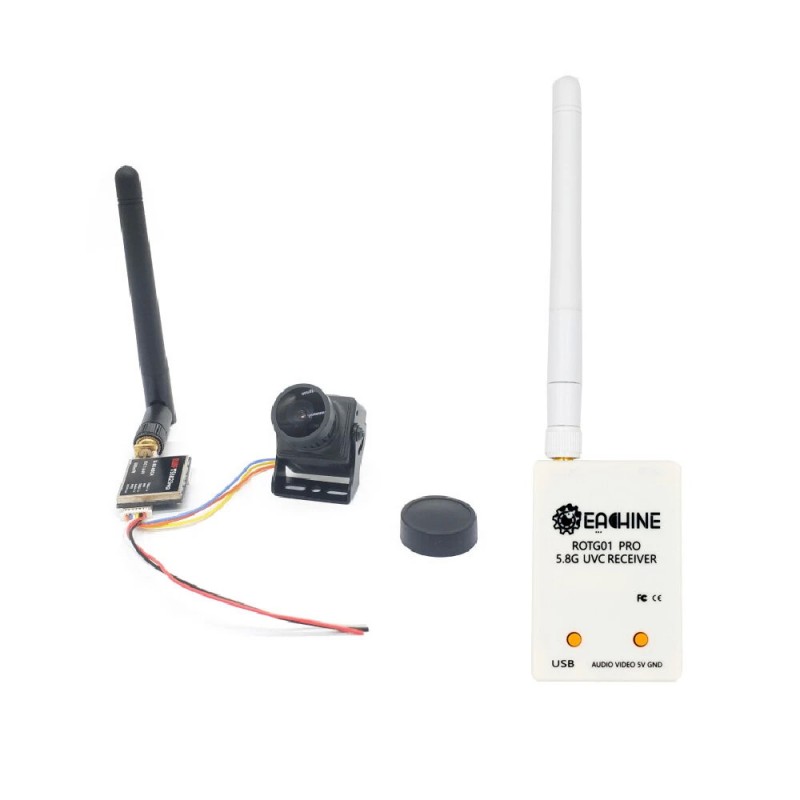
EWRF UVC Video Downlink OTG VR Android Phone +5.8G 600mw Transmitter TS5823 Pro+CMOS 1200TVL Camera
(SKU): EWRF-COMBO
EWRF UVC Video Downlink OTG VR Android Phone +5.8G 600mw Transmitter TS5823 Pro+CMOS 1200TVL Camera
Διαθέσιμο
Άλλες πληροφορίες
Description:
| Brand Name: | EWRF |
| Item Name: | FPV Transmitter + Camera Combo |
| Item Name: | TS5823Pro |
| Frequency: | 5.8G |
| Channel: | 40 |
| Transmitting Power: | 600mW/OFF(Pitmode) |
| Working Current: | 230mA (12V) |
| Power Supply: | DC 7-24V |
| Weight: | 5g |
| Dimension: | 30x20x8mm |
Specifications of FPV Camera:
| Horizontal Resolution : | 1200TVL |
| Format : | PAL |
| FOV | 130° |
| PAL: | 1920H×1080V(1MP) |
| NTSC: | 1020H×1920V (1MP) |
| Video Output : | 1.0Vp p/75ohm |
| AGC : | 0.25/0.50/0.75/1.00 4 levels adjustable, up to max. 55dB |
| White Balance: | ON/OFF |
| Exposure Type: | Electronic Exposure |
| Electronic Shutter : | 1/50(1/60) 1/100000 Second |
| Gamma Correction : | 0.45/1.0 |
| Synchronization Mode : | Inter Sync |
| Lens: | 2.5mm |
| Working Voltag: | DC 5 to 12V(Wide Voltag, Measured 5 to 13V) |
| Working Current: | 70mA(ow power consumption) |
| Working Temp.: | -20 degree to 60 degree |
| Wetness: | 0% ~ 98% |
| Size: | 22mm x 22mm |
Features:
- 600mW/OFF(Pitmode)
- Miniature and light weight design
- 5V BEC output for camera, RC receiver
- Clean powerup and channel switching without interference to others
- Overheating protection to prevent premature damage.
- Distance : (Both the transmitting and receiving antennas are used, in a relatively open and unobstructed environment) Aircraft: about 1-2 kilometers. Car and ship models: about 50-200 meters. User Guide
1. Setting
After power on, the digital display shows the following three parameters in turn: band, channel, and frequency. Press and hold the button can be entered into the parameters setting. - Press and hold the button, the digital display will shows the alphabet for band( A-B - C1- D -E) , press the button can select the bands.
- Press and hold the button again, When the digital display shows the Arabic numerals for the channel (1-8), press the button can select the channels.
- Finally, press and hold the button, VTX is back to normal working state and the band, channel, frequency will display in turn on the digital display.
2. Pitmode Work State
- Press the button twice will toggle the ON/ OFF of Pitmode.
- Pitmode work state: Press the button twice, the red dot appears on the right bottom of the digital display which means the VTX is off.
- Normal working state: Press the button twice again, the red dot disappear on the right bottom of the digital display which means the VTX is on, the VTX is back to normal working state.
- Pitmode transmits a tiny amount of power and the transmitting distance is about 2- 3 meters.
Frequency(Mhz):
| Band | CH1 | CH2 | CH3 | CH4 | CH5 | CH6 | CH7 | CH8 |
| A | 5865 | 5845 | 5825 | 5805 | 5785 | 5765 | 5745 | 5725 |
| b | 5733 | 5752 | 5771 | 5790 | 5809 | 5828 | 5847 | 5866 |
| C | 5705 | 5685 | 5665 | 5645 | 5885 | 5905 | 5925 | 5945 |
| d | 5740 | 5760 | 5780 | 5800 | 5820 | 5840 | 5860 | 5880 |
| E | 5658 | 5695 | 5732 | 5769 | 5806 | 5843 | 5880 | 5917 |
Note: 1.Make sure that there is enough space for airflow when installing the module on the drone.
2. Please install the antenna before powering up for a longer use life.
Package Included:1x EWRF TS5823Pro FPV Transmitter 1x 1200TVL Camera 1x Antenna 2x Cable


